Getting started
This guide takes you from a fresh install to your first automated pull request. It takes about ten minutes. You need Code Akos installed and set up, and an app written in Python, Node.js or JavaScript for the browser.
In Code Akos, a project is one GitHub repository and the branch you want fixes for. Each project gets its own address, called a DSN, which you give to the Sentry SDK in your app. You can add as many projects as you like.
1. Create a GitHub token
Code Akos needs a GitHub token to open issues and pull requests on your repository. Use a fine-grained personal access token, which can be limited to one repository:
- On GitHub, open Settings › Developer settings › Personal access tokens › Fine-grained tokens and click Generate new token.
- Under Repository access, choose Only select repositories and pick your repository.
-
Under Permissions, give it the following:
Permission Access Why Contents Read and write To copy the code and push the branch with the fix Issues Read and write To open issues and comment on them Pull requests Read and write To open the pull request with the fix -
Generate the token and copy it. It starts with
github_pat_.
Prefer two tokens?
Filing issues only needs Contents: read and Issues: read and write. If you don't want the main token to be able to push code, create a second token with the write permissions and use it only for pull requests. The Add project window has an option for this.
2. Add the project
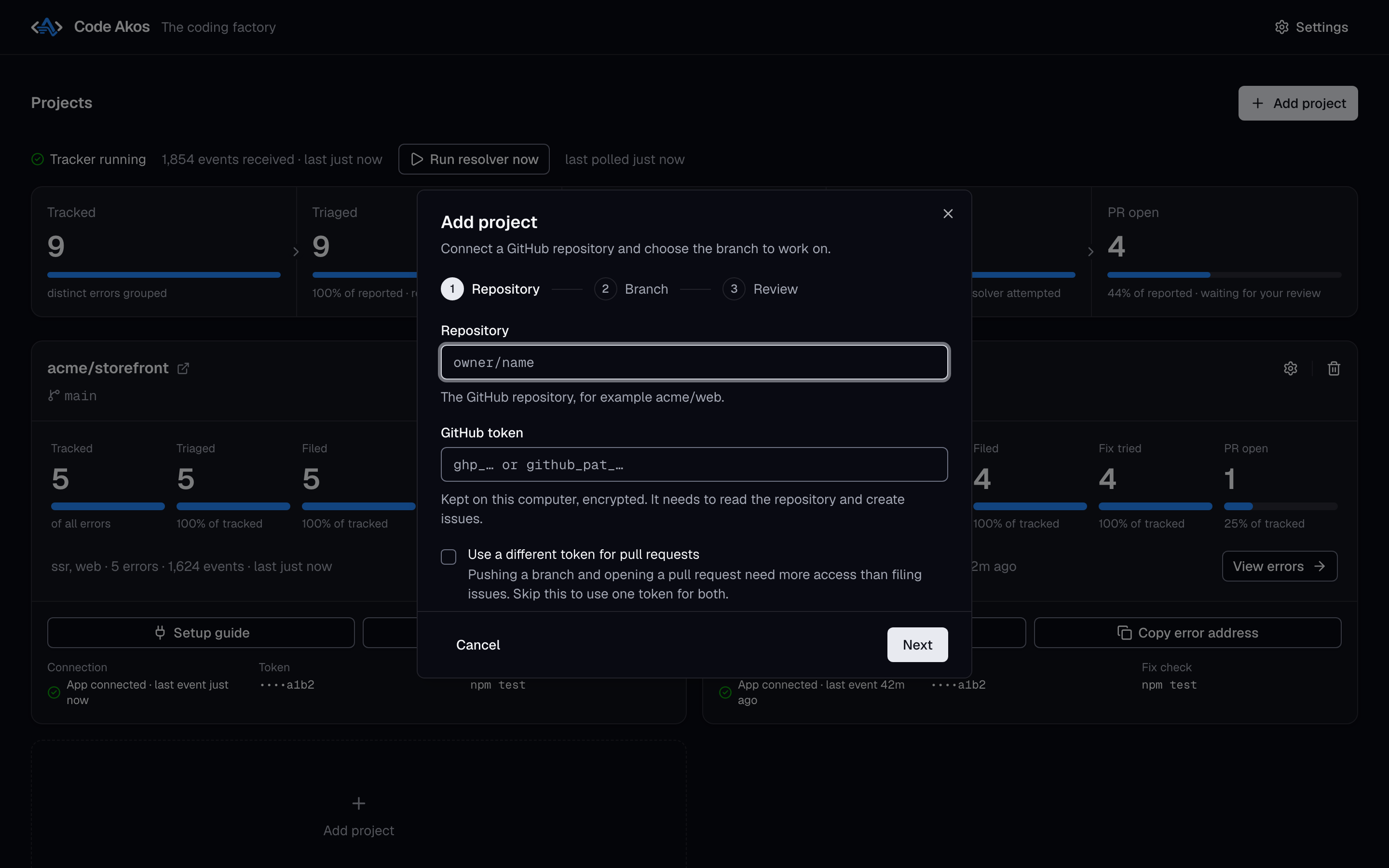
In the dashboard, click Add project. The window has three steps.
- Repository. Enter the repository as
owner/name, for exampleacme/storefront, and paste your token. Tick Use a different token for pull requests if you made a second token. -
Branch. Choose the branch Code Akos should work on, usually
main. Errors are filed against it, fixes start from its latest commit and pull requests are opened against it.You can also enter a command to check a fix, such as
npm ci && npm testorpytest. Code Akos runs it before and after every fix. A pull request whose check passed is marked verified. Without a command, pull requests are marked unverified. The command runs on your computer as you, so only enter something you would run yourself. -
Review. Check the details and click Add project.
Code Akos checks the token with GitHub before saving it, stores it encrypted on your computer and makes a copy of the repository in the background.
3. Connect your app
Click Setup guide on the project's card. The guide shows the code for Python, Node.js and the browser, with your project's DSN already filled in. It looks like http://codeakos@localhost:3000/1, where the number at the end is the project's ID.
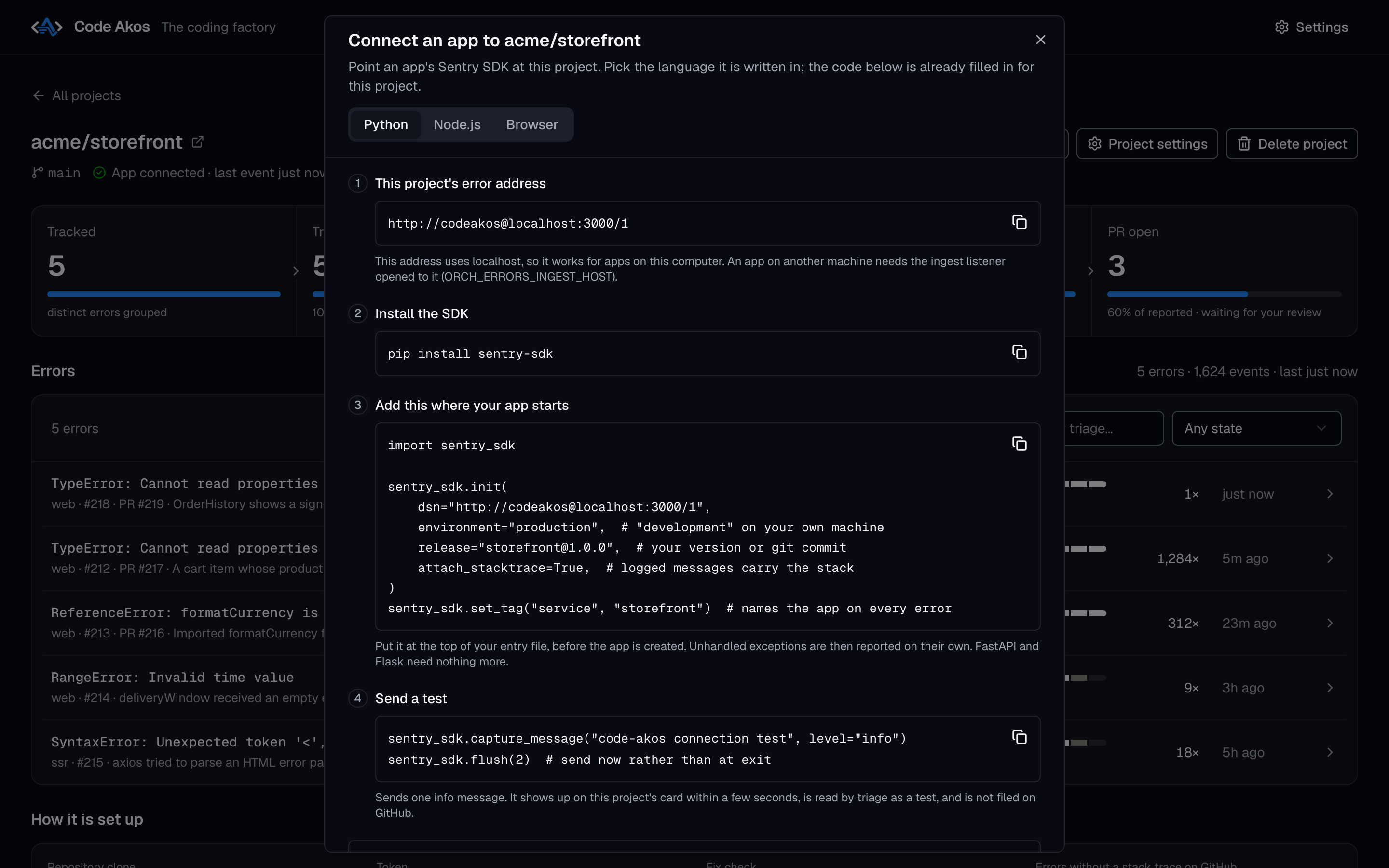
If your app already uses Sentry, you only need to replace the dsn value. Otherwise, install the SDK and add the setup code where your app starts.
import sentry_sdk

sentry_sdk.init(
    dsn="http://codeakos@localhost:3000/1",
    environment="production",  # "development" on your own machine
    release="storefront@1.0.0",  # your version or git commit
    attach_stacktrace=True,  # logged messages carry the stack
)
sentry_sdk.set_tag("service", "storefront")  # names the app on every error
Put this at the top of your entry file, before the app is created. Unhandled exceptions are then reported automatically. The SDK switches on its Django, Flask and FastAPI support by itself, so those need nothing more.
import * as Sentry from "@sentry/node";

Sentry.init({
  dsn: "http://codeakos@localhost:3000/1",
  environment: process.env.NODE_ENV ?? "production",
  release: "storefront@1.0.0", // your version or git commit
  attachStacktrace: true, // logged messages carry the stack
  initialScope: { tags: { service: "storefront" } },
});
Save this as instrument.mjs and load it before the rest of your app, for example with node --import ./instrument.mjs app.mjs. Unhandled exceptions and promise rejections are then reported automatically. TypeScript uses the same code.
import * as Sentry from "@sentry/browser";

Sentry.init({
  dsn: "http://codeakos@localhost:3000/1",
  environment: "production",
  release: "storefront@1.0.0", // your version or git commit
  attachStacktrace: true, // logged messages carry the stack
  initialScope: { tags: { service: "storefront" } },
});
Code Akos does not apply source maps, so errors from a minified production bundle point at minified code that the model cannot trace back to your source files. Errors from an unminified build work best.
What each setting does:
| Setting | Why it matters |
|---|---|
dsn |
Where errors are sent: your project's address in Code Akos. |
environment |
Tells production errors apart from ones on your laptop. |
release |
Your app's version or git commit, so a bug can be tied to the change that caused it. |
attach_stacktrace / attachStacktrace |
Adds the call stack to logged messages. Without a stack, an error is kept in Code Akos but never filed on GitHub. |
service tag |
Names the app. Errors from different apps are never grouped together. |
App on another computer?
localhost only works when your app runs on the same computer as Code Akos. For an app on a server or another machine, open Settings, set Accept reports from to Any machine on the network, and replace localhost in the DSN with the address of the computer running Code Akos.
Apps running in Docker
Inside a container, localhost is the container itself, so the DSN above will not work there. When Code Akos runs on your computer and your app runs in a container, the setup guide has a Running in Docker section with a DSN that uses host.docker.internal, the name containers use for the host. For example:
services:
  my-app:
    environment:
      SENTRY_DSN: "http://codeakos@host.docker.internal:3000/1"
    extra_hosts:
      - "host.docker.internal:host-gateway" # Linux needs this line; Docker Desktop does not
    init: true # passes the stop signal to your app, so it can send its last errors
To check the connection from a container, run this. It should print {"status":"ok"}:
docker run --rm --add-host=host.docker.internal:host-gateway curlimages/curl -s http://host.docker.internal:3000/healthz
On Linux
Code Akos only accepts reports from its own computer at first, and a container counts as another machine. Open Settings and set Accept reports from to Any machine on the network (ORCH_ERRORS_INGEST_HOST). When you do, also set ORCH_ERRORS_DSN_PUBLIC_KEY, because anyone who can reach the port can send errors. Docker Desktop on Mac and Windows needs neither.
When a container stops, an app that exits at once loses the errors from its last moments. Call sentry_sdk.flush() (Python) or Sentry.close() (Node.js) when the app receives SIGTERM.
To run Code Akos itself in Docker, see Running in Docker.
4. Send a test
Send one message to check the connection:
Within a few seconds, the project's card shows App connected and the message appears in its error list. Triage recognises it as a test (tag test-event), so it is not filed on GitHub.
If nothing arrives, check that Code Akos is running, that the DSN matches the one in the setup guide exactly, and that your app can reach the ingest port. Running curl http://localhost:3000/healthz on the Code Akos computer should print {"status":"ok"}.
5. Watch an error become a pull request
Now cause a real error. For example, call a function that does not exist somewhere in your code, and trigger it:
def checkout(cart):
    return format_total(cart)  # format_total is never defined, so this raises NameError
This is what happens next:
- Tracked. The error appears on the project page, grouped with any repeats.
- Triaged. The model reads it and writes what happened and what to do. A missing name like this one is usually tagged
bot-safe, meaning a small fix in your own code. - Filed. Code Akos opens a GitHub issue titled
[Error] NameError: name 'format_total' is not defined, with the stack trace and the lines of code involved. - Fix tried. Within 5 minutes, the resolver picks up the issue. To start it right away, click Run resolver now on the Projects page. It runs your check command, lets the model make a small change, and runs the check again.
- PR open. A pull request titled
Fix: [Error] NameError: …appears on GitHub. Its description explains the change, lists the files, says whether the check passed and starts withCloses #<issue>, so merging it closes the issue.
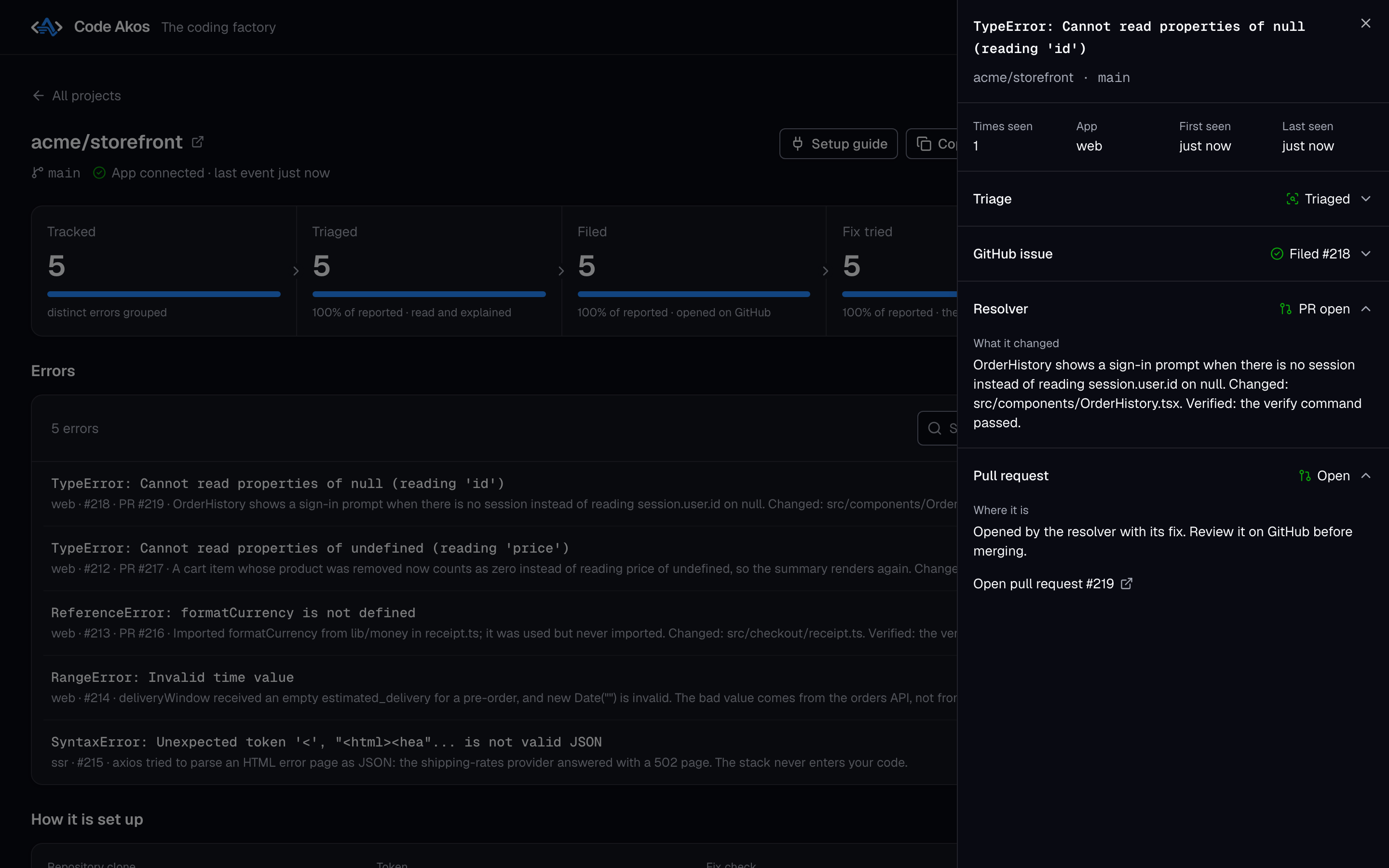
Review the pull request like any other: read the diff, run it if needed, and merge it or close it. Code Akos never merges on its own.
Next steps
- Using the dashboard: everything else you can see and do in Code Akos.
- How the AI fixes work: which issues are attempted, retries and cost.
- Sentry errors to GitHub issues: grouping rules and what goes into each issue.